If you have spent any time in a Salesforce org, you have seen triggers written every which way: business logic stuffed inside the trigger body, SOQL queries inside loops, recursion causing the same record to update three times, and twenty different triggers on the Account object all firing in unpredictable order. It does not have to be this way. The community has converged on a clean, scalable approach known as the Trigger–Handler–Helper pattern. In this guide, we will walk through what it is, why it matters, and how to implement it with a real Account example you can deploy today.
Why Not Just Write Logic in the Trigger?
Here is what a beginner trigger usually looks like:
trigger AccountTrigger on Account (before insert, before update, after insert, after update) {
    if (Trigger.isBefore && Trigger.isInsert) {
        for (Account a : Trigger.new) {
            a.Description = 'New Account';
            // ... more logic
        }
    }
    if (Trigger.isAfter && Trigger.isUpdate) {
        List<Contact> contactsToUpdate = new List<Contact>();
        for (Account a : Trigger.new) {
            List<Contact> contacts = [SELECT Id FROM Contact WHERE AccountId = :a.Id]; // SOQL in loop!
            // ... more logic
        }
        update contactsToUpdate;
    }
}
This works for one developer on one object on day one. It breaks down fast because:
• It violates the "one trigger per object" rule — when someone adds another trigger later, execution order becomes unpredictable
• Business logic is mixed with control flow, making it impossible to unit test in isolation
• It encourages governor limit violations like SOQL and DML inside loops
• It cannot be reused — if another process needs the same logic, you copy-paste
• Recursion control is hard to add cleanly
The Three-Layer Pattern
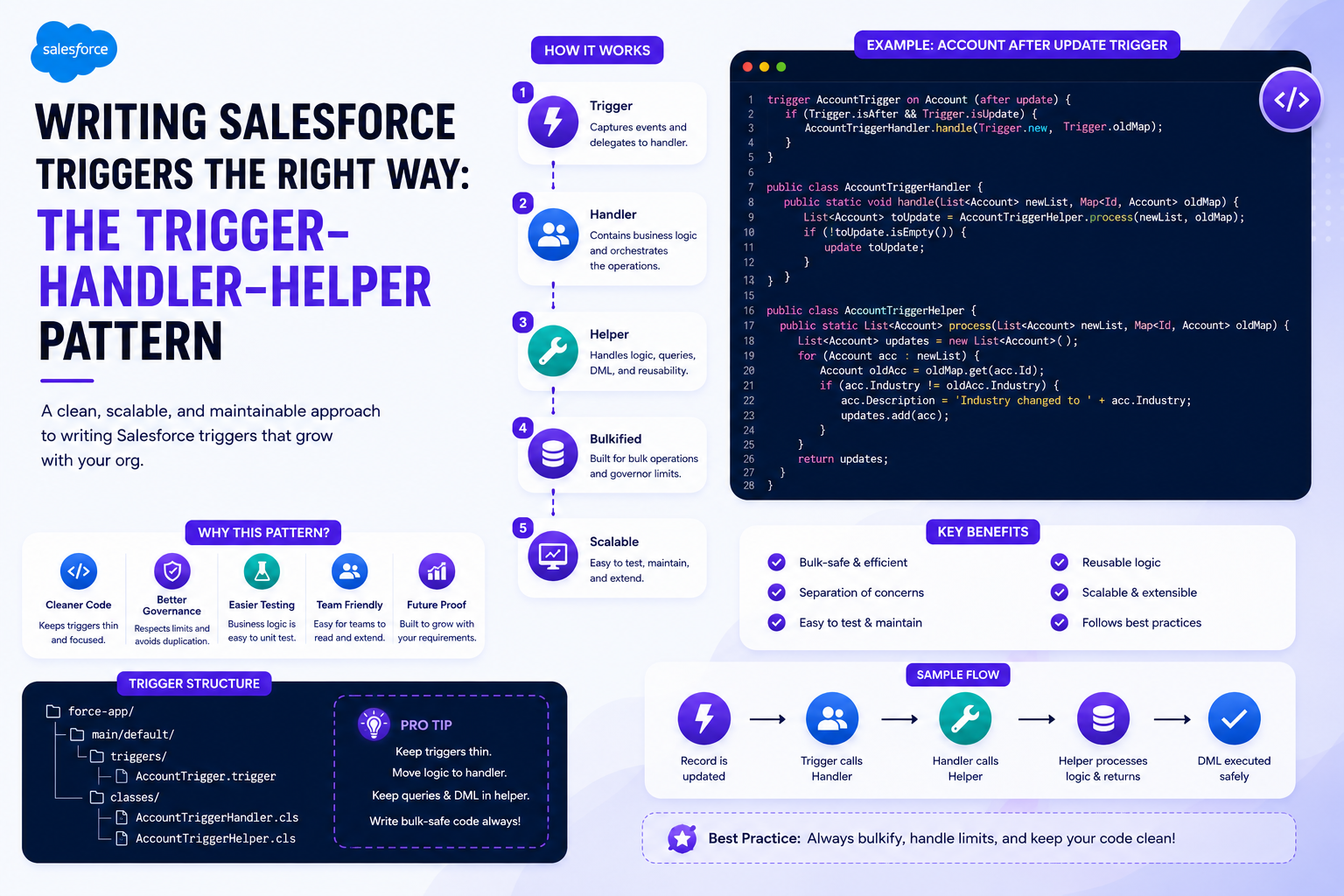
The idea is simple: separate what fires, what decides, and what does the work. Each layer has exactly one job and never reaches across into another layer's responsibility.
Trigger (entry point)
   ↓
Handler (routes context: before/after, insert/update/delete)
   ↓
Helper (does the actual work — pure business logic)
Here is how the responsibilities split:
| Layer | Responsibility |
|---|---|
| Trigger | Catch the DML event and delegate. Nothing else. |
| Handler | Decide which method to run based on trigger context. |
| Helper | Contain the actual business logic. Reusable, testable, focused. |
A Real Example
Let us say we have this requirement: when an Account's Industry changes to "Technology," we need to update all its related Contacts with a Department value of "Tech Division." We will implement this end-to-end across the three layers.
Step 1 — The Trigger
The trigger is dumb on purpose. It does nothing except hand off to the handler. One trigger per object, all events covered, no logic inside — that is the entire rule.
trigger AccountTrigger on Account (
    before insert, before update, before delete,
    after insert, after update, after delete, after undelete
) {
    new AccountTriggerHandler().run();
}
Step 2 — The Handler
The handler routes the execution context to the right method. Many teams extend a base TriggerHandler class (the open-source one by Kevin Poorman is widely used), but here is a simplified version to show the idea. Notice that the handler does not do anything — it just decides who should do it.
public class AccountTriggerHandler {

    public void run() {
        if (Trigger.isBefore) {
            if (Trigger.isInsert) beforeInsert(Trigger.new);
            if (Trigger.isUpdate) beforeUpdate(Trigger.new, Trigger.oldMap);
        }
        if (Trigger.isAfter) {
            if (Trigger.isInsert) afterInsert(Trigger.new);
            if (Trigger.isUpdate) afterUpdate(Trigger.new, Trigger.oldMap);
        }
    }

    private void beforeInsert(List<Account> newAccounts) {
        AccountTriggerHelper.setDefaultDescription(newAccounts);
    }

    private void beforeUpdate(List<Account> newAccounts, Map<Id, Account> oldMap) {
        // Add before-update logic delegations here
    }

    private void afterInsert(List<Account> newAccounts) {
        // Add after-insert logic delegations here
    }

    private void afterUpdate(List<Account> newAccounts, Map<Id, Account> oldMap) {
        AccountTriggerHelper.updateContactsForTechAccounts(newAccounts, oldMap);
    }
}
Step 3 — The Helper
This is where the real work happens. Each helper method does one thing, takes its inputs as parameters (not from Trigger.* directly), and is fully testable. Because the inputs are plain collections, you can call these methods from a batch class, a queueable, or a test class with fabricated records — they are not bound to the trigger context.
public class AccountTriggerHelper {

    public static void setDefaultDescription(List<Account> newAccounts) {
        for (Account a : newAccounts) {
            if (String.isBlank(a.Description)) {
                a.Description = 'New Account created on ' + Date.today().format();
            }
        }
    }

    public static void updateContactsForTechAccounts(
        List<Account> newAccounts,
        Map<Id, Account> oldMap
    ) {
        // 1. Collect IDs of accounts that just became "Technology"
        Set<Id> techAccountIds = new Set<Id>();
        for (Account a : newAccounts) {
            Account oldA = oldMap.get(a.Id);
            if (a.Industry == 'Technology' && oldA.Industry != 'Technology') {
                techAccountIds.add(a.Id);
            }
        }

        if (techAccountIds.isEmpty()) return;

        // 2. One SOQL outside the loop
        List<Contact> contactsToUpdate = [
            SELECT Id, Department
            FROM Contact
            WHERE AccountId IN :techAccountIds
        ];

        // 3. Modify in memory
        for (Contact c : contactsToUpdate) {
            c.Department = 'Tech Division';
        }

        // 4. One DML outside the loop
        if (!contactsToUpdate.isEmpty()) {
            update contactsToUpdate;
        }
    }
}
Best Practices This Pattern Enforces
Once you adopt this structure, most Salesforce trigger best practices fall into place naturally:
• One trigger per object — if every object has exactly one trigger that delegates to a handler, you will never fight unpredictable execution order again
• Bulkify everything — the handler passes collections (List, Map) to the helper, which iterates once and operates on the whole collection
• No SOQL or DML inside loops — collect IDs first, query once, modify in memory, then DML once at the end
• Avoid hardcoding IDs — use Custom Metadata Types or Custom Settings for any values that might change between sandbox and production
• Keep helpers pure and testable — because each method takes its data as parameters, you can write fast unit tests with fabricated lists and no DML setup
Controlling Recursion
Recursion happens when your handler updates a record, which fires the trigger again, which updates the record again. Add a static guard at the handler level — a Set
public class AccountTriggerHandler {
    private static Set<Id> processedIds = new Set<Id>();

    public void run() {
        List<Account> toProcess = new List<Account>();
        for (Account a : (List<Account>) Trigger.new) {
            if (!processedIds.contains(a.Id)) {
                toProcess.add(a);
                processedIds.add(a.Id);
            }
        }
        // ... route toProcess to helper methods
    }
}
Adding a Kill Switch
A Custom Metadata Type like Trigger_Settings__mdt with a checkbox to disable each trigger is a lifesaver during bulk data loads or emergency hotfixes. Read the setting at the start of run() and return early if the trigger is disabled — no deployment required to silence broken automation.
public void run() {
    Trigger_Settings__mdt settings = Trigger_Settings__mdt.getInstance('Account');
    if (settings != null && settings.Is_Disabled__c) return;
    // ... rest of run()
}
Comparison: Trigger Body vs Handler vs Framework
| Concern | Logic in Trigger | Handler + Helper | Framework (fflib / Poorman) |
|---|---|---|---|
| Setup effort | None | One class per object | Base class + per-object class |
| Testability | Hard — needs DML | High — pure methods | High — built-in mocking |
| Recursion control | Manual flags | Static Set in handler | Built into base class |
| Kill switch | Manual code edits | Custom Metadata read | Often built-in |
| Best for | Throwaway demos | Most production orgs | Large enterprise orgs |
When You Should Still Be Careful
The pattern is not a silver bullet. A few things to watch:
• Do not put too much in one helper class — if your AccountTriggerHelper grows past 500 lines, split it into focused helpers like AccountContactSyncHelper or AccountTerritoryHelper
• Do not fire the same logic from both before and after contexts — use before for setting fields on the same record, after for related-record operations and for getting the record's Id on insert
• Watch governor limits across the chain — even with the pattern, multiple helpers each running SOQL can blow the 100-query limit, so cache shared data in the handler when possible
• Do not use this pattern for Flow-friendly automation — if a Flow can do the job declaratively without performance concerns, that is often the better choice. Reserve triggers for what Flow cannot do well (complex bulk operations, recursive control, deep cross-object logic)
Wrapping Up
The Trigger–Handler–Helper pattern is not about being fancy — it is about writing code that the next developer (or future-you) can read, test, and extend without breaking things. The recipe is short: one trigger per object with no logic in it, a handler that routes context to methods, helper classes that hold pure and bulkified business logic, and recursion control plus a kill switch baked in from day one. Adopt it once, and you will never want to go back to stuffing logic inside trigger bodies — whether you prefer fflib, the Apex Trigger Framework by Kevin Poorman, or your own custom variant, the underlying principle is the same: keep triggers thin, handlers focused, and business logic isolated and testable.